Skip to content

Training & onboarding

Create AI training and employee onboarding videos.

ScreenDub is an AI training video maker for real software workflows and slide decks. Create narrated, replayable lessons and written guides without turning every subject-matter expert into a full-time instructor.

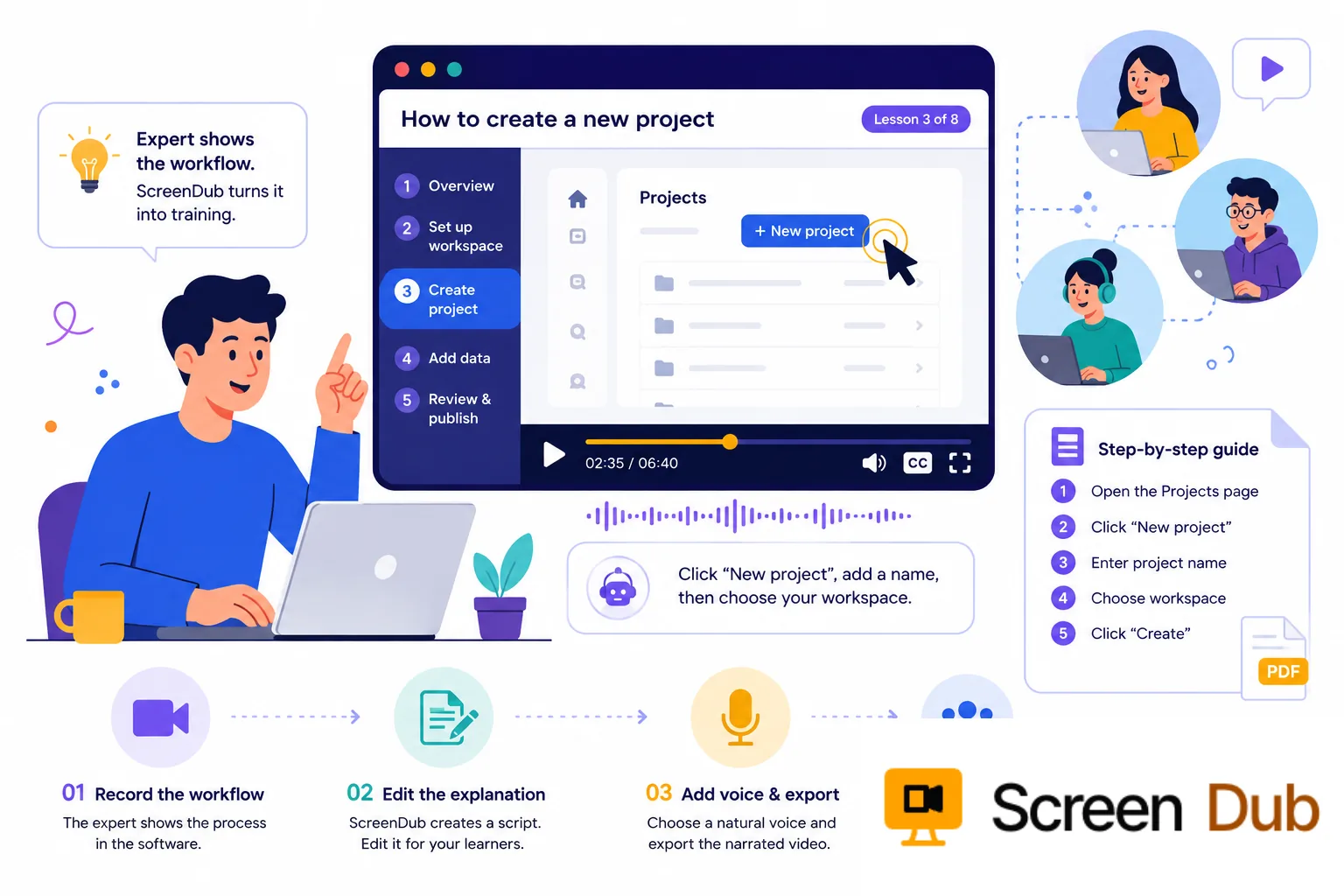
Training and onboarding workflow turning an expert process into a replayable lesson

Growing teams cannot scale by repeating the same shadowing session. Experts lose hours to the same tool tour, new hires retain different details, and a process change leaves an old recording teaching yesterday's work.

Policies and slide decks establish context but rarely show the decision points inside the software. Raw recordings show clicks but not the why. Effective enablement combines the real workflow with clear narration, visual cues, and a reference learners can return to.

Training scales when every learner gets the same clear explanation on demand.

ScreenDub gives subject-matter experts a lightweight way to make that kind of lesson. Record the software silently, edit the generated narration, and export a polished video without turning the expert into a presenter. The written guide gives learners another path through the same material.

The moments that matter

Teach the work where people actually do it.

The most useful lesson is close to the real tool, process, and decision the learner needs to make.

01

A new hire joins

Give every teammate the same practical tour of the tools and workflows they need before asking an expert to repeat the basics.

02

A process changes

Update the training with the current product path instead of leaving a recording that teaches yesterday’s interface.

03

A role needs depth

Create focused modules for sales, support, operations, or product teams without forcing everyone through one oversized course.

04

A team spans regions

Give learners a narrated version and written guide in the language that makes the workflow easiest to understand.

The workflow

Let the expert teach without becoming a video producer.

01

Let the expert do the work once

Record the process as it really happens in the software. The subject-matter expert can focus on the workflow instead of memorizing a script or recording a perfect voiceover.

02

Shape the lesson around the learner

ScreenDub detects the actions and writes a timed script. Edit it to explain why each step matters, call out common mistakes, and use the terminology your team recognizes.

03

Give people more than one way to learn

Export the narrated video for watching and a written guide for scanning or reference. Learners can pause, replay, and return to the exact step later.

04

Refresh the module when the work changes

Keep the source recording with the lesson. When a tool or process changes, record the new path and update the module without rebuilding a course from scratch.

What the learner gets

One lesson that works in more than one setting.

New-hire onboarding

Show new teammates the real tools, steps, and expected result they need to reach their first milestone.

A repeatable procedure

Turn an expert demonstration into a visual lesson and a written handout managers can assign again.

Localized training

Create translated narration and documentation from one approved workflow when your learners work in different regions.

A learning checkpoint

Give people something they can revisit after a live session instead of relying on memory or scattered notes.

A practical boundary

Build the lesson, but keep ownership with the training team.

ScreenDub is strongest when the learner needs to see a software workflow, repeatable process, or practical task. It helps a training team move faster, but it does not decide the learning objective, assessment, or policy behind the lesson.

Have the subject-matter expert review the script and the final workflow. Keep sensitive data out of the recording, and use your existing LMS or learning process for access, completion, and certification requirements.

FAQ

Questions, answered.

What training videos can ScreenDub create?

ScreenDub is suited to software onboarding, internal tool training, process lessons, feature education, and practical walkthroughs. It is especially useful when learners need to see the sequence of actions inside a product.

Can an expert create training without recording their voice?

Yes. The expert can silently record the workflow. ScreenDub creates a first-pass script and lets you edit the narration before selecting a natural AI voice for the lesson.

Can the training include written instructions too?

Yes. The workflow can produce a narrated video and a step-by-step written guide, giving learners both a lesson and a reference they can return to later.

Can we use ScreenDub for compliance training?

It can help explain software procedures and repeatable internal workflows. Your compliance, legal, or security team should still review the lesson and own the requirements, approvals, and completion records.

Make the next lesson easier to repeat.

Record the workflow once. Give every learner a clear video and guide they can use when they need it.

Start for free